> ## Documentation Index
> Fetch the complete documentation index at: https://docs.retellai.com/llms.txt
> Use this file to discover all available pages before exploring further.
# Handle voicemail and IVR
> Configure Retell agents to detect voicemails and IVR systems on outbound calls and choose what to do next — hang up, leave a message, or navigate the menu.
When making [outbound calls](/deploy/outbound-call), your agent may reach a voicemail or an IVR (Interactive Voice Response) menu instead of a person. You can configure the agent to detect these automatically and choose what happens next.
To test the configured behavior without dialing, play a recorded greeting or menu prompt into a [web call](/test/test-web). The agent uses the same detection and actions, but the web call does not reach a real voicemail inbox or phone menu.
For example, an outbound reminder campaign can leave a callback message whenever it reaches a voicemail, instead of hanging up silently.
To capture keypad input from the person on the other end, see [capture DTMF input](/build/user-dtmf).
 ## Voicemail detection
The system runs voicemail detection during the first 3 minutes after the call connects. You can choose what happens when a voicemail is detected:
* **Hang up** — disconnect immediately, even if the voicemail greeting is still playing.
* **Leave a message** — wait for the agent's turn to speak, then deliver a message. Supports [dynamic variables](/build/dynamic-variables).
If no voicemail is detected in those 3 minutes, detection stops and the call continues normally.
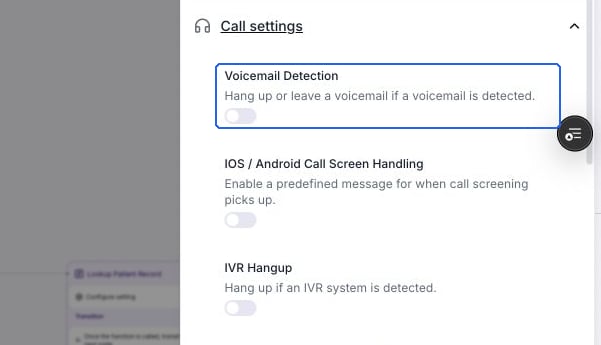
Open **Call settings** in the agent editor and check **Voicemail Detection**. For a conversation flow, select **Global settings** first. Enable detection if it is off.
New blank voice agents created in the dashboard start with voicemail detection enabled and **Hang up if reaching voicemail** selected. This default does not change existing agents, imported configurations, or transfer agents. When creating an agent through the API, set `voicemail_option` explicitly for the behavior you want.
Select one of the following options:
* **Hang up if reaching voicemail**: The agent disconnects when it detects a voicemail.
* **Leave a message if reaching voicemail**: The agent waits for its turn to speak, then leaves a message. Choose between:
* **Prompt**: A dynamically generated message based on instructions you provide, such as `Summarize the call and ask the user to call back.`
* **Static Sentence**: A fixed message, such as `Hey {{user_name}}, sorry we could not reach you directly. Please give us a callback if you can.`
## IVR hangup
When enabled, the system detects an IVR (automated phone menu) and hangs up an outbound phone call or web call.
IVR hangup is separate from [IVR navigation](/build/single-multi-prompt/press-digit), which lets your agent interact with and navigate through IVR menus using DTMF tones.
To enable, navigate to your agent settings, then open **Call settings** and toggle on **IVR Hangup**.
## FAQ
No. Voicemail and IVR detection run on [outbound phone calls](/deploy/outbound-call) and web calls when configured. On inbound phone calls a person is calling your agent, so there is no voicemail to detect and these settings have no effect.
This most likely means the call is being classified as an IVR rather than a voicemail. Because the two detection types are handled separately, voicemail hang up will not trigger in this case. Enable **IVR Hangup** in your agent's **Call settings** to handle this scenario and automatically disconnect when an IVR system is detected.
No. Voicemail and IVR detection run only during the first 3 minutes after the call connects, and this window isn't configurable. Time spent in an IVR menu or talking with a person counts toward it, so a voicemail reached later in the call, such as after a person on the other end transfers the call, isn't detected.
Voicemail detection is optimized for real-time use cases and generally adds under 30ms of latency.
If voicemail is detected, the call will have a [disconnection reason](/reliability/debug-call-disconnect) of `voicemail_reached`. If IVR is detected, the disconnection reason will be `ivr_reached`.
Yes. When set to hang up, the agent disconnects immediately upon detection, regardless of whether the voicemail greeting is still playing.
No. When set to leave a message, the agent waits for its turn to speak before delivering the message.
This documentation is built and hosted on [Mintlify](https://mintlify.com), a developer documentation platform.
## Voicemail detection
The system runs voicemail detection during the first 3 minutes after the call connects. You can choose what happens when a voicemail is detected:
* **Hang up** — disconnect immediately, even if the voicemail greeting is still playing.
* **Leave a message** — wait for the agent's turn to speak, then deliver a message. Supports [dynamic variables](/build/dynamic-variables).
If no voicemail is detected in those 3 minutes, detection stops and the call continues normally.
Open **Call settings** in the agent editor and check **Voicemail Detection**. For a conversation flow, select **Global settings** first. Enable detection if it is off.
New blank voice agents created in the dashboard start with voicemail detection enabled and **Hang up if reaching voicemail** selected. This default does not change existing agents, imported configurations, or transfer agents. When creating an agent through the API, set `voicemail_option` explicitly for the behavior you want.
Select one of the following options:
* **Hang up if reaching voicemail**: The agent disconnects when it detects a voicemail.
* **Leave a message if reaching voicemail**: The agent waits for its turn to speak, then leaves a message. Choose between:
* **Prompt**: A dynamically generated message based on instructions you provide, such as `Summarize the call and ask the user to call back.`
* **Static Sentence**: A fixed message, such as `Hey {{user_name}}, sorry we could not reach you directly. Please give us a callback if you can.`
## IVR hangup
When enabled, the system detects an IVR (automated phone menu) and hangs up an outbound phone call or web call.
IVR hangup is separate from [IVR navigation](/build/single-multi-prompt/press-digit), which lets your agent interact with and navigate through IVR menus using DTMF tones.
To enable, navigate to your agent settings, then open **Call settings** and toggle on **IVR Hangup**.
## FAQ
No. Voicemail and IVR detection run on [outbound phone calls](/deploy/outbound-call) and web calls when configured. On inbound phone calls a person is calling your agent, so there is no voicemail to detect and these settings have no effect.
This most likely means the call is being classified as an IVR rather than a voicemail. Because the two detection types are handled separately, voicemail hang up will not trigger in this case. Enable **IVR Hangup** in your agent's **Call settings** to handle this scenario and automatically disconnect when an IVR system is detected.
No. Voicemail and IVR detection run only during the first 3 minutes after the call connects, and this window isn't configurable. Time spent in an IVR menu or talking with a person counts toward it, so a voicemail reached later in the call, such as after a person on the other end transfers the call, isn't detected.
Voicemail detection is optimized for real-time use cases and generally adds under 30ms of latency.
If voicemail is detected, the call will have a [disconnection reason](/reliability/debug-call-disconnect) of `voicemail_reached`. If IVR is detected, the disconnection reason will be `ivr_reached`.
Yes. When set to hang up, the agent disconnects immediately upon detection, regardless of whether the voicemail greeting is still playing.
No. When set to leave a message, the agent waits for its turn to speak before delivering the message.
This documentation is built and hosted on [Mintlify](https://mintlify.com), a developer documentation platform.