> ## Documentation Index
> Fetch the complete documentation index at: https://docs.retellai.com/llms.txt
> Use this file to discover all available pages before exploring further.
# Transcription modes
> Configure Retell AI transcription modes for speed or accuracy, choose a custom speech recognition provider, and override settings in conversation flow nodes.
Transcription Mode controls how Retell turns the caller's speech into text. Choose an agent-wide default, then override it in individual conversation or subagent nodes when a step needs different transcription settings.
Transcription modes apply to cascading voice agents, which use a separate speech recognition provider. They do not apply to chat agents or speech-to-speech models.
## Which mode should I use?
* **Optimize for speed**: Use for responsive conversation. This is the default when no mode is configured.
* **Optimize for accuracy**: Try this when collecting details such as account numbers or dates, or when transcripts cut off before the caller finishes.
* **Custom Settings**: Choose a [speech recognition provider](/build/asr-providers) and tune its endpointing for your use case.
The presets use provider configurations chosen for the agent's languages. Their latency difference depends on the language and provider; accuracy mode does not add a fixed delay. Open **(Provider Config)** beside a preset to inspect its current provider and endpointing information.
For example, an appointment-booking flow can use speed mode globally and accuracy mode only in the node that collects a date of birth. Later nodes without an override use the global mode again.
## Set the agent default
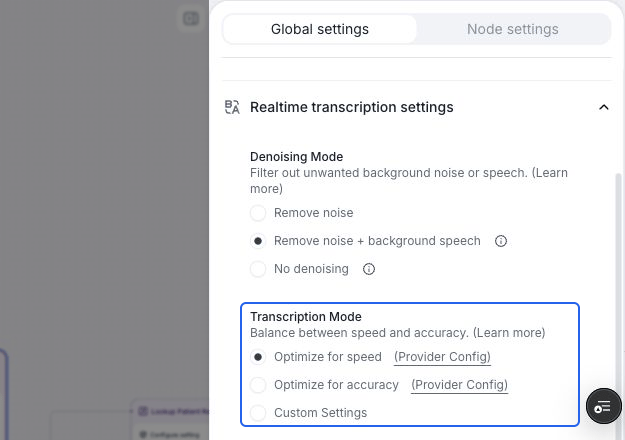
Open **Realtime transcription settings** in the agent editor and find **Transcription Mode**. For a conversation flow, select **Global settings** first. Choose a preset or configure [Custom Settings](#custom-settings).
 ## Override transcription for a node
[Conversation nodes](/build/conversation-flow/conversation-node) and [subagent nodes](/build/conversation-flow/subagent-node) support their own transcription mode.
## Override transcription for a node
[Conversation nodes](/build/conversation-flow/conversation-node) and [subagent nodes](/build/conversation-flow/subagent-node) support their own transcription mode.
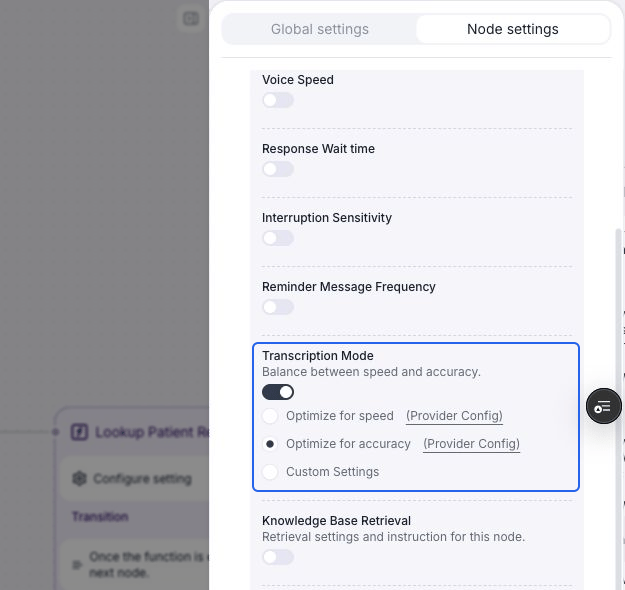 Select the node on the canvas, then select **Node settings** in the right panel. Expand the **Node settings** section if it is collapsed.
Under **Node-level overrides**, turn on **Transcription Mode**. It starts with the agent's current global mode. For a custom global mode, it also starts with the global provider and endpointing, where supported.
Select **Optimize for speed**, **Optimize for accuracy**, or **Custom Settings**. The setting applies while this node is active. On transition, Retell restores the agent default and applies the next node's override, if any.
Use a [web test](/test/test-web) to check the transcript and response timing for that step. Turn off the node's **Transcription Mode** override to inherit the global setting again.
An enabled override keeps its own values when you change the global mode. Turn it off if the node should follow future global changes.
## Custom settings
Select **Custom Settings**, then choose a **Provider** that supports all of the agent's selected languages. For providers with an **Endpointing** control, adjust how long the transcriber waits to finalize speech. A longer window can help callers who pause while reading numbers, but can also delay the agent's response.
Select the node on the canvas, then select **Node settings** in the right panel. Expand the **Node settings** section if it is collapsed.
Under **Node-level overrides**, turn on **Transcription Mode**. It starts with the agent's current global mode. For a custom global mode, it also starts with the global provider and endpointing, where supported.
Select **Optimize for speed**, **Optimize for accuracy**, or **Custom Settings**. The setting applies while this node is active. On transition, Retell restores the agent default and applies the next node's override, if any.
Use a [web test](/test/test-web) to check the transcript and response timing for that step. Turn off the node's **Transcription Mode** override to inherit the global setting again.
An enabled override keeps its own values when you change the global mode. Turn it off if the node should follow future global changes.
## Custom settings
Select **Custom Settings**, then choose a **Provider** that supports all of the agent's selected languages. For providers with an **Endpointing** control, adjust how long the transcriber waits to finalize speech. A longer window can help callers who pause while reading numbers, but can also delay the agent's response.
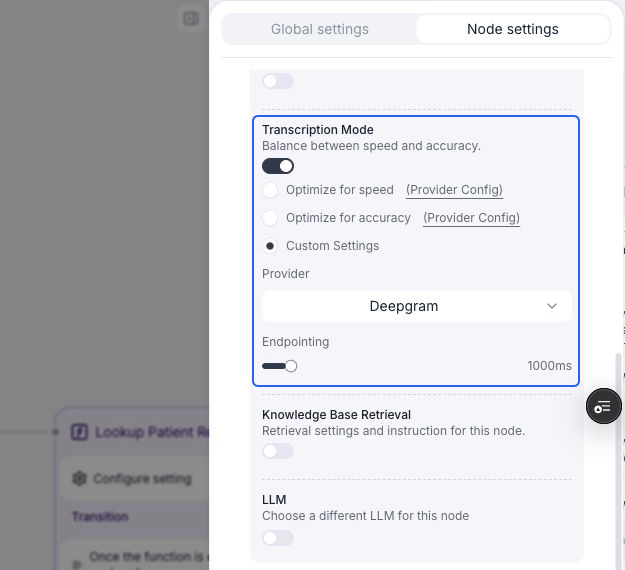 **Endpointing** is separate from [Response Wait time](/build/conversation-flow/global-setting#configure-speech-settings), which adds a minimum wait before the agent responds. Check both settings when troubleshooting slow replies.
The dashboard offers these endpointing controls, in milliseconds (as of October 2026):
| Provider | Slider range | Default when no value is configured |
| - | - | - |
| Deepgram | 100–10,000 ms | 1,000 ms |
| Azure | 100–10,000 ms | 1,000 ms |
| Soniox | 500–3,000 ms | 1,500 ms |
| AssemblyAI | 100–3,000 ms | 1,500 ms |
When changing providers, the dashboard preserves the existing endpointing value where it fits the new provider's range. These are dashboard slider bounds; API validation limits can differ.
The selected provider is tried first. Retell can still use fallback providers if it becomes unavailable. See [provider selection and fallback](/build/asr-providers#how-retell-picks-a-provider).
## FAQ
The dashboard needs to load language support and find a provider that supports every selected language. If loading fails, use **Retry loading language support**. If no provider covers the combination, choose a preset or change the [agent languages](/agent/multilingual). If the global mode is custom and no compatible provider is available, change the global mode to a preset before enabling the node override.
No. It applies while that node is active. Other nodes inherit the global mode unless they have their own override. Turning off an override removes its node-specific mode and custom configuration.
This documentation is built and hosted on [Mintlify](https://mintlify.com), a developer documentation platform.
**Endpointing** is separate from [Response Wait time](/build/conversation-flow/global-setting#configure-speech-settings), which adds a minimum wait before the agent responds. Check both settings when troubleshooting slow replies.
The dashboard offers these endpointing controls, in milliseconds (as of October 2026):
| Provider | Slider range | Default when no value is configured |
| - | - | - |
| Deepgram | 100–10,000 ms | 1,000 ms |
| Azure | 100–10,000 ms | 1,000 ms |
| Soniox | 500–3,000 ms | 1,500 ms |
| AssemblyAI | 100–3,000 ms | 1,500 ms |
When changing providers, the dashboard preserves the existing endpointing value where it fits the new provider's range. These are dashboard slider bounds; API validation limits can differ.
The selected provider is tried first. Retell can still use fallback providers if it becomes unavailable. See [provider selection and fallback](/build/asr-providers#how-retell-picks-a-provider).
## FAQ
The dashboard needs to load language support and find a provider that supports every selected language. If loading fails, use **Retry loading language support**. If no provider covers the combination, choose a preset or change the [agent languages](/agent/multilingual). If the global mode is custom and no compatible provider is available, change the global mode to a preset before enabling the node override.
No. It applies while that node is active. Other nodes inherit the global mode unless they have their own override. Turning off an override removes its node-specific mode and custom configuration.
This documentation is built and hosted on [Mintlify](https://mintlify.com), a developer documentation platform.