> ## Documentation Index
> Fetch the complete documentation index at: https://docs.retellai.com/llms.txt
> Use this file to discover all available pages before exploring further.
# Consume the analysis data
> Read Retell Post Call Extraction results from the dashboard, the call_analyzed webhook, or the Get Call API, and feed them into your CRM or reports.
We will not populate custom Post Call Extraction fields for calls that were not connected or where no conversation took place. Please check whether the field exists before using it.
After a call is analyzed, you can access the analysis results through three different methods:
1. Dashboard - Visual interface for quick access and review
2. Webhook - Real-time notifications with analysis results
3. API - Programmatic access to call analysis data
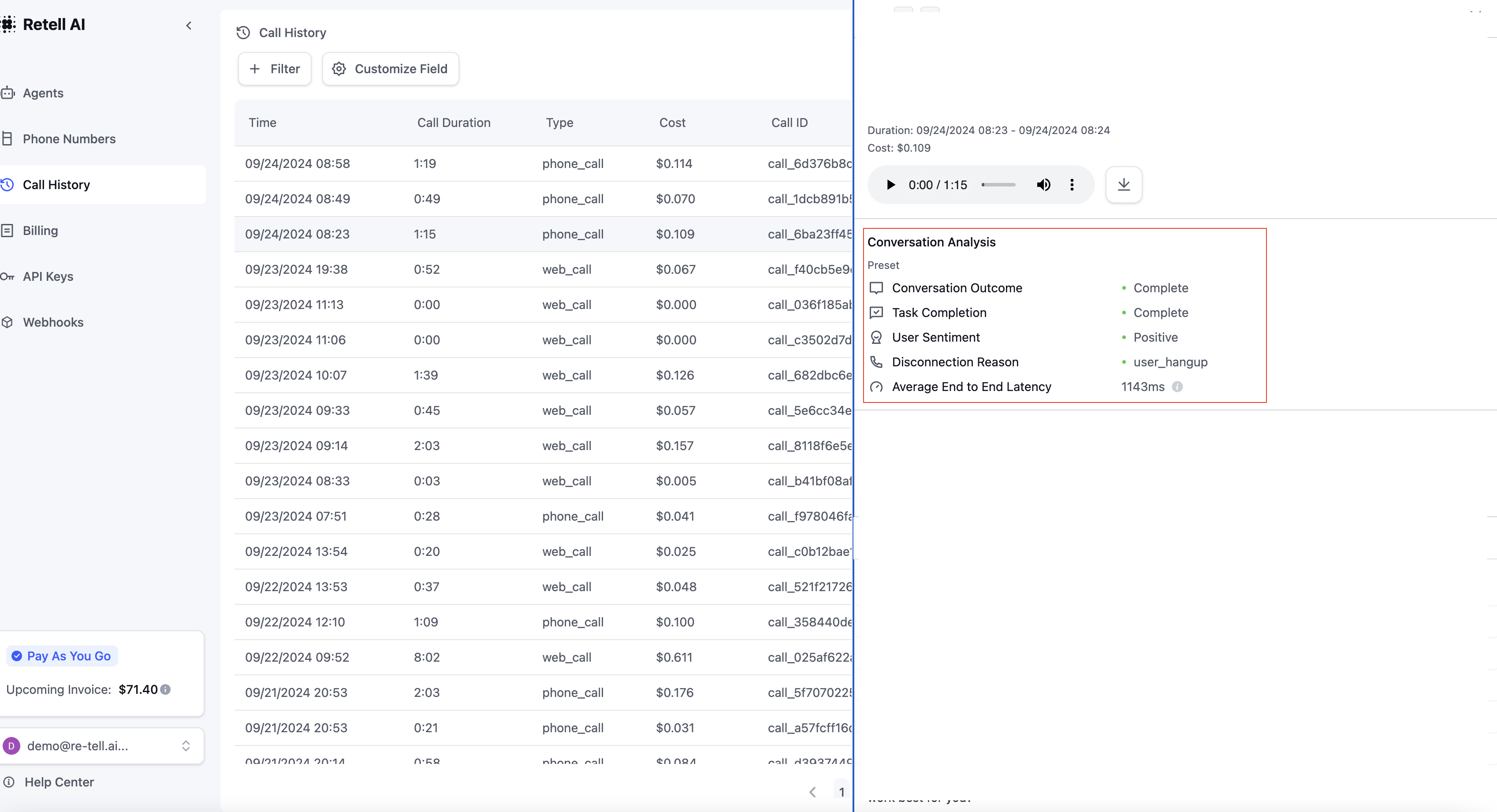
### Method 1: Dashboard
Access your analysis results directly through the dashboard's history tab. This provides a user-friendly interface to:
* View all analyzed conversations
* Filter and search through analysis results
Your defined analysis categories appear in the "Conversation Analysis" column, allowing for quick insights into each conversation.
### Method 2: Webhook
Receive real-time notifications when call analysis is complete. The `call` field contains the same call object returned by the [Get Call API](/api-references/get-call), with `call_analysis` populated. A sample payload:
```json theme={"dark"}
{
"event": "call_analyzed",
"call": {
"call_type": "phone_call",
"from_number": "+12137771234",
"to_number": "+12137771235",
"direction": "inbound",
"call_id": "Jabr9TXYYJHfvl6Syypi88rdAHYHmcq6",
"agent_id": "oBeDLoLOeuAbiuaMFXRtDOLriTJ5tSxD",
"call_status": "ended",
"metadata": {},
"retell_llm_dynamic_variables": {
"customer_name": "John Doe"
},
"start_timestamp": 1714608475945,
"end_timestamp": 1714608491736,
"disconnection_reason": "user_hangup",
"transcript": "...",
"transcript_object": [ ... ],
"transcript_with_tool_calls": [ ... ],
"call_analysis": {
"call_summary": "The agent called the user to ask about their purchase inquiry. The user agreed to book an appointment next Monday at 10am.",
"in_voicemail": false,
"user_sentiment": "Positive",
"call_successful": true,
"custom_analysis_data": {
"appointment_booked": true
}
}
}
}
```
The `call_analysis` object contains:
| Field | Type | Description |
| - | - | - |
| `call_summary` | string | A high-level summary of the call. |
| `in_voicemail` | boolean | Whether the call reached voicemail. |
| `user_sentiment` | string | One of `Positive`, `Negative`, `Neutral`, or `Unknown`. |
| `call_successful` | boolean | Whether the agent completed its task without the call being cut off. |
| `custom_analysis_data` | object | Values for the custom Post Call Extraction fields you defined on the agent. Keys match your field names. Empty if you defined none. |
Analysis data lives on the `call_analysis` object, and the `call_ended` webhook payload excludes `call_analysis`. Listen to `call_analyzed` (not `call_ended`) to read fields like `call_summary`, `user_sentiment`, `call_successful`, and any custom extracted fields. Reading them from a `call_ended` payload returns `null` or `undefined`. See [Webhook overview](/features/webhook-overview) for the payload difference between events.
To set up webhooks, visit the [Webhook Configuration](/features/webhook-overview) section.
### Method 3: Get Call API
Retrieve analysis results programmatically using the [Get Call API](/api-references/get-call).
**Example Response:**
```json theme={"dark"}
{
"call_id": "123",
"call_analysis": {
// Analysis results object
}
}
```
For detailed API documentation and response schemas, refer to the [API Reference](/api-references/get-call).
### Video: Add Post Call Extraction to Excel Using Make.com
See community templates in [docs](https://docs.google.com/document/d/1hx6hdTEjAR4y4xXZ7RLMH2byQNVW1ABxC8S4FwvTx_Y/edit?tab=t.0#heading=h.wf5bktkelope).
This documentation is built and hosted on [Mintlify](https://mintlify.com), a developer documentation platform.
 ### Method 2: Webhook
Receive real-time notifications when call analysis is complete. The `call` field contains the same call object returned by the [Get Call API](/api-references/get-call), with `call_analysis` populated. A sample payload:
```json theme={"dark"}
{
"event": "call_analyzed",
"call": {
"call_type": "phone_call",
"from_number": "+12137771234",
"to_number": "+12137771235",
"direction": "inbound",
"call_id": "Jabr9TXYYJHfvl6Syypi88rdAHYHmcq6",
"agent_id": "oBeDLoLOeuAbiuaMFXRtDOLriTJ5tSxD",
"call_status": "ended",
"metadata": {},
"retell_llm_dynamic_variables": {
"customer_name": "John Doe"
},
"start_timestamp": 1714608475945,
"end_timestamp": 1714608491736,
"disconnection_reason": "user_hangup",
"transcript": "...",
"transcript_object": [ ... ],
"transcript_with_tool_calls": [ ... ],
"call_analysis": {
"call_summary": "The agent called the user to ask about their purchase inquiry. The user agreed to book an appointment next Monday at 10am.",
"in_voicemail": false,
"user_sentiment": "Positive",
"call_successful": true,
"custom_analysis_data": {
"appointment_booked": true
}
}
}
}
```
The `call_analysis` object contains:
| Field | Type | Description |
| - | - | - |
| `call_summary` | string | A high-level summary of the call. |
| `in_voicemail` | boolean | Whether the call reached voicemail. |
| `user_sentiment` | string | One of `Positive`, `Negative`, `Neutral`, or `Unknown`. |
| `call_successful` | boolean | Whether the agent completed its task without the call being cut off. |
| `custom_analysis_data` | object | Values for the custom Post Call Extraction fields you defined on the agent. Keys match your field names. Empty if you defined none. |
### Method 2: Webhook
Receive real-time notifications when call analysis is complete. The `call` field contains the same call object returned by the [Get Call API](/api-references/get-call), with `call_analysis` populated. A sample payload:
```json theme={"dark"}
{
"event": "call_analyzed",
"call": {
"call_type": "phone_call",
"from_number": "+12137771234",
"to_number": "+12137771235",
"direction": "inbound",
"call_id": "Jabr9TXYYJHfvl6Syypi88rdAHYHmcq6",
"agent_id": "oBeDLoLOeuAbiuaMFXRtDOLriTJ5tSxD",
"call_status": "ended",
"metadata": {},
"retell_llm_dynamic_variables": {
"customer_name": "John Doe"
},
"start_timestamp": 1714608475945,
"end_timestamp": 1714608491736,
"disconnection_reason": "user_hangup",
"transcript": "...",
"transcript_object": [ ... ],
"transcript_with_tool_calls": [ ... ],
"call_analysis": {
"call_summary": "The agent called the user to ask about their purchase inquiry. The user agreed to book an appointment next Monday at 10am.",
"in_voicemail": false,
"user_sentiment": "Positive",
"call_successful": true,
"custom_analysis_data": {
"appointment_booked": true
}
}
}
}
```
The `call_analysis` object contains:
| Field | Type | Description |
| - | - | - |
| `call_summary` | string | A high-level summary of the call. |
| `in_voicemail` | boolean | Whether the call reached voicemail. |
| `user_sentiment` | string | One of `Positive`, `Negative`, `Neutral`, or `Unknown`. |
| `call_successful` | boolean | Whether the agent completed its task without the call being cut off. |
| `custom_analysis_data` | object | Values for the custom Post Call Extraction fields you defined on the agent. Keys match your field names. Empty if you defined none. |