> ## Documentation Index
> Fetch the complete documentation index at: https://docs.retellai.com/llms.txt
> Use this file to discover all available pages before exploring further.
# Debug call disconnection
> Diagnose why a Retell call disconnected — look up the `disconnection_reason` in the dashboard or Get Call API and follow the table of causes and fixes.
Open the call in [Call History](/features/session-history) or retrieve it with the [Get Call API](/api-references/get-call) to find its disconnection reason.
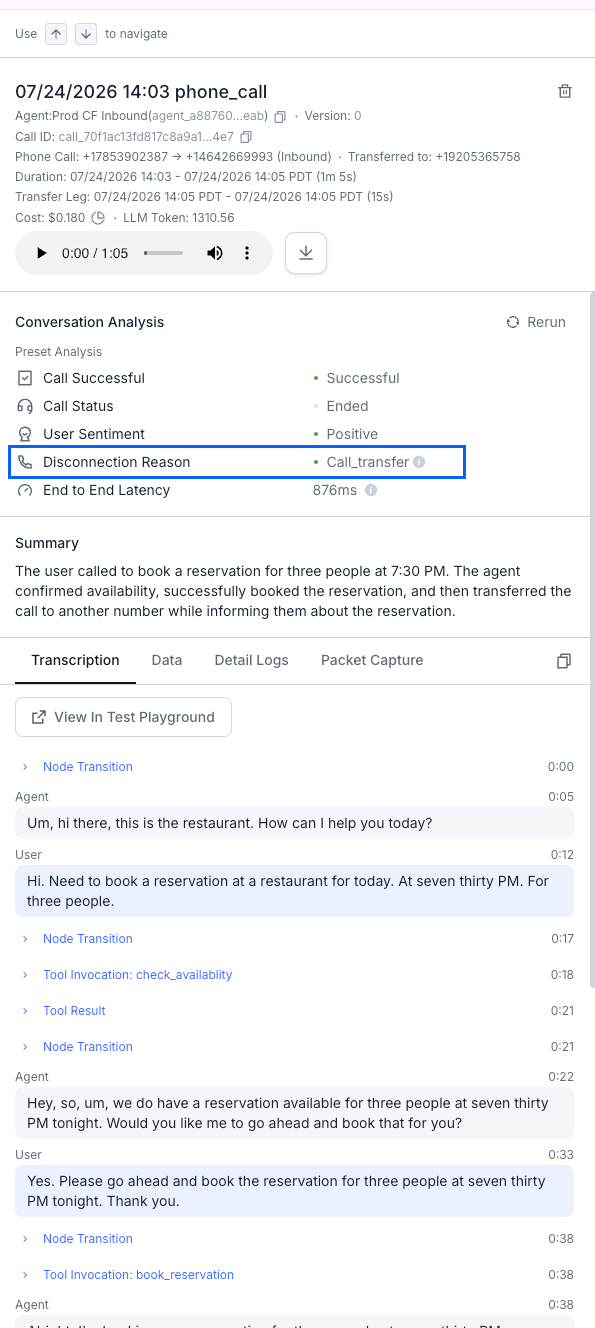 `disconnection_reason` applies only to voice calls. Chats don't have an equivalent field. The [chat object](/api-references/get-chat) exposes only `chat_status` (`ongoing`, `ended`, or `error`).
## Diagnosing disconnection reasons
Find the reason in the table below, then follow the fix. For deeper diagnosis of specific cases:
* **`not_connected` outbound calls** (`dial_failed`, `invalid_destination`, spam blocks, and other SIP failures) — see [debug outbound connection issues](/reliability/debug-outbound-call).
* **SIP-level signaling and media** — inspect the call's PCAP file, covered in [debug SIP calls using PCAP files](/reliability/debug-calls-pcap).
When a phone number makes many short calls in a short period, carriers might mark it as spam. The number then gets blocked and shows up as `dial_failed`.
| Disconnection reason | Call status | Description |
| - | - | - |
| `user_hangup` | ended | Expected behavior, user hung up the call. |
| `agent_hangup` | ended | Expected behavior, agent hung up the call. |
| `user_requested_dnc` | ended | Expected behavior, the user confirmed a [do-not-call request](/build/do-not-call) and the agent ended the call. |
| `call_transfer` | ended | Expected behavior, agent transferred the call. |
| `transfer_bridged` | ended | Expected behavior, on the transfer agent's call of an [agentic warm transfer](/build/conversation-flow/call-transfer-node): the transfer agent decided to bridge, and the original caller was connected to the transfer target. |
| `transfer_cancelled` | ended | On the transfer agent's call of an [agentic warm transfer](/build/conversation-flow/call-transfer-node): the caller was NOT connected — the transfer agent cancelled the transfer, or it timed out without a decision (e.g. the transfer target did not pick up or went to voicemail). |
| `call_take_over` | ended | Expected behavior, a human took over the call from the agent, which permanently stops the agent for that call. |
| `voicemail_reached` | ended | Expected behavior, if the agent is configured with [voicemail settings](/build/handle-voicemail), and voicemail is reached. |
| `ivr_reached` | ended | Expected behavior, if the agent is configured to [hang up when encountering an IVR system](/build/handle-voicemail#ivr-hangup), and IVR is reached. |
| `inactivity` | ended | Expected behavior, call was terminated due to the "end\_call\_after\_silence\_ms" setting reached after long inactivity. |
| `max_duration_reached` | ended | Expected behavior, call was terminated due to [maximum duration](/deploy/concurrency#max-call-duration) reached. |
| `dial_busy` | not\_connected | Outbound call not connected, the number dialed is busy. |
| `dial_failed` | not\_connected | Outbound call not connected, dialing failed with no or unknown sip error code. |
| `dial_no_answer` | not\_connected | Outbound call not connected, the number dialed did not answer. |
| `invalid_destination` | not\_connected | Outbound call not connected, the number dialed is invalid. Can be due to spaces or invalid characters in the number. Or it can be your telephony provider requiring a specific format (like E.164 format). |
| `telephony_provider_permission_denied` | not\_connected | Outbound call not connected, the sip trunk credentials are not authenticated. |
| `telephony_provider_unavailable` | not\_connected | Outbound call not connected, the telephony provider is unavailable. |
| `sip_routing_error` | not\_connected | Outbound call not connected, the sip routing is going over too many hops or is in a loop. |
| `marked_as_spam` | not\_connected | Outbound call not connected, the number dialed is marked as spam. See [Spam Likely Overview](/build/telephony/call_efficiency_overview). |
| `network_blocked` | not\_connected | Outbound call not connected, the dialed number's carrier network blocked the call. Commonly the carrier network's spam filter blocking the call. See [Spam Likely Overview](/build/telephony/call_efficiency_overview). |
| `user_declined` | not\_connected | Outbound call not connected, user declined the call. |
| `concurrency_limit_reached` | error | Error, [concurrency limit](/deploy/concurrency) reached, add a retry with exponential backoff. Or consider enterprise plan. |
| `no_concurrency_fallback` | ended | Inbound call could not get a concurrency slot and was transferred to the configured fallback number. |
| `no_valid_payment` | error | Error, no valid payment registered on file, or service shut down due to bill overdue. |
| `credit_exhausted` | error | Error, the workspace's credit balance reached zero, so usage stopped. Buy credits or turn on [auto recharge](/accounts/billing#set-up-auto-recharge). If auto recharge is on, check for a [failed payment](/accounts/fail-payment). |
| `budget_reached` | error | Error, the workspace reached 100% of its [monthly budget](/accounts/billing#set-a-monthly-budget), so calls and API requests paused. Raise the budget, turn it off, or wait until the next calendar month starts (UTC). A remaining credit balance does not resume usage. |
| `scam_detected` | error | Error, scam detected for that particular agent. |
| `error_llm_websocket_open` | error | Error, LLM websocket did not open between Retell server and your backend. Likely because the Custom LLM URL is incorrect or your LLM server is unreachable. See [custom LLM troubleshooting](/integrate-llm/troubleshooting#connection-failures). |
| `error_llm_websocket_lost_connection` | error | Error, LLM websocket connection broke during the call. Often a missing `ping_pong` echo or a host idle timeout. See [custom LLM troubleshooting](/integrate-llm/troubleshooting#the-call-drops-after-a-few-seconds). |
| `error_llm_websocket_runtime` | error | Error, LLM websocket received a closing signal other than `1000` from your server. |
| `error_llm_websocket_corrupt_payload` | error | Error, LLM websocket received unspecified payload, such as a binary frame instead of text. |
| `error_no_audio_received` | error | Error, has not received audio from Twilio or web frontend for a while after connection has been established. |
| `error_asr` | error | Error, Retell's ASR encountered a problem. |
| `error_retell` | error | Error, unspecified Retell side problem. |
| `error_unknown` | error | Error, unknown error. |
| `error_user_not_joined` | error | Error, user did not join web call within 30s after calling startWebCall. |
| `registered_call_timeout` | error | Error, phone call is 5 minutes or more apart from registration. |
This documentation is built and hosted on [Mintlify](https://mintlify.com), a developer documentation platform.
`disconnection_reason` applies only to voice calls. Chats don't have an equivalent field. The [chat object](/api-references/get-chat) exposes only `chat_status` (`ongoing`, `ended`, or `error`).
## Diagnosing disconnection reasons
Find the reason in the table below, then follow the fix. For deeper diagnosis of specific cases:
* **`not_connected` outbound calls** (`dial_failed`, `invalid_destination`, spam blocks, and other SIP failures) — see [debug outbound connection issues](/reliability/debug-outbound-call).
* **SIP-level signaling and media** — inspect the call's PCAP file, covered in [debug SIP calls using PCAP files](/reliability/debug-calls-pcap).
When a phone number makes many short calls in a short period, carriers might mark it as spam. The number then gets blocked and shows up as `dial_failed`.
| Disconnection reason | Call status | Description |
| - | - | - |
| `user_hangup` | ended | Expected behavior, user hung up the call. |
| `agent_hangup` | ended | Expected behavior, agent hung up the call. |
| `user_requested_dnc` | ended | Expected behavior, the user confirmed a [do-not-call request](/build/do-not-call) and the agent ended the call. |
| `call_transfer` | ended | Expected behavior, agent transferred the call. |
| `transfer_bridged` | ended | Expected behavior, on the transfer agent's call of an [agentic warm transfer](/build/conversation-flow/call-transfer-node): the transfer agent decided to bridge, and the original caller was connected to the transfer target. |
| `transfer_cancelled` | ended | On the transfer agent's call of an [agentic warm transfer](/build/conversation-flow/call-transfer-node): the caller was NOT connected — the transfer agent cancelled the transfer, or it timed out without a decision (e.g. the transfer target did not pick up or went to voicemail). |
| `call_take_over` | ended | Expected behavior, a human took over the call from the agent, which permanently stops the agent for that call. |
| `voicemail_reached` | ended | Expected behavior, if the agent is configured with [voicemail settings](/build/handle-voicemail), and voicemail is reached. |
| `ivr_reached` | ended | Expected behavior, if the agent is configured to [hang up when encountering an IVR system](/build/handle-voicemail#ivr-hangup), and IVR is reached. |
| `inactivity` | ended | Expected behavior, call was terminated due to the "end\_call\_after\_silence\_ms" setting reached after long inactivity. |
| `max_duration_reached` | ended | Expected behavior, call was terminated due to [maximum duration](/deploy/concurrency#max-call-duration) reached. |
| `dial_busy` | not\_connected | Outbound call not connected, the number dialed is busy. |
| `dial_failed` | not\_connected | Outbound call not connected, dialing failed with no or unknown sip error code. |
| `dial_no_answer` | not\_connected | Outbound call not connected, the number dialed did not answer. |
| `invalid_destination` | not\_connected | Outbound call not connected, the number dialed is invalid. Can be due to spaces or invalid characters in the number. Or it can be your telephony provider requiring a specific format (like E.164 format). |
| `telephony_provider_permission_denied` | not\_connected | Outbound call not connected, the sip trunk credentials are not authenticated. |
| `telephony_provider_unavailable` | not\_connected | Outbound call not connected, the telephony provider is unavailable. |
| `sip_routing_error` | not\_connected | Outbound call not connected, the sip routing is going over too many hops or is in a loop. |
| `marked_as_spam` | not\_connected | Outbound call not connected, the number dialed is marked as spam. See [Spam Likely Overview](/build/telephony/call_efficiency_overview). |
| `network_blocked` | not\_connected | Outbound call not connected, the dialed number's carrier network blocked the call. Commonly the carrier network's spam filter blocking the call. See [Spam Likely Overview](/build/telephony/call_efficiency_overview). |
| `user_declined` | not\_connected | Outbound call not connected, user declined the call. |
| `concurrency_limit_reached` | error | Error, [concurrency limit](/deploy/concurrency) reached, add a retry with exponential backoff. Or consider enterprise plan. |
| `no_concurrency_fallback` | ended | Inbound call could not get a concurrency slot and was transferred to the configured fallback number. |
| `no_valid_payment` | error | Error, no valid payment registered on file, or service shut down due to bill overdue. |
| `credit_exhausted` | error | Error, the workspace's credit balance reached zero, so usage stopped. Buy credits or turn on [auto recharge](/accounts/billing#set-up-auto-recharge). If auto recharge is on, check for a [failed payment](/accounts/fail-payment). |
| `budget_reached` | error | Error, the workspace reached 100% of its [monthly budget](/accounts/billing#set-a-monthly-budget), so calls and API requests paused. Raise the budget, turn it off, or wait until the next calendar month starts (UTC). A remaining credit balance does not resume usage. |
| `scam_detected` | error | Error, scam detected for that particular agent. |
| `error_llm_websocket_open` | error | Error, LLM websocket did not open between Retell server and your backend. Likely because the Custom LLM URL is incorrect or your LLM server is unreachable. See [custom LLM troubleshooting](/integrate-llm/troubleshooting#connection-failures). |
| `error_llm_websocket_lost_connection` | error | Error, LLM websocket connection broke during the call. Often a missing `ping_pong` echo or a host idle timeout. See [custom LLM troubleshooting](/integrate-llm/troubleshooting#the-call-drops-after-a-few-seconds). |
| `error_llm_websocket_runtime` | error | Error, LLM websocket received a closing signal other than `1000` from your server. |
| `error_llm_websocket_corrupt_payload` | error | Error, LLM websocket received unspecified payload, such as a binary frame instead of text. |
| `error_no_audio_received` | error | Error, has not received audio from Twilio or web frontend for a while after connection has been established. |
| `error_asr` | error | Error, Retell's ASR encountered a problem. |
| `error_retell` | error | Error, unspecified Retell side problem. |
| `error_unknown` | error | Error, unknown error. |
| `error_user_not_joined` | error | Error, user did not join web call within 30s after calling startWebCall. |
| `registered_call_timeout` | error | Error, phone call is 5 minutes or more apart from registration. |
This documentation is built and hosted on [Mintlify](https://mintlify.com), a developer documentation platform.