

- Register your business profile. This runs several checks to make sure your business is eligible for an A2P 10DLC campaign.
- Create a brand and get it verified. This registers your brand with the carriers. After verification, you receive a Trust Score, which sets how many messages you can send a day.
- Create a campaign and get it approved. This describes the messages you’ll send and how people opt in.
Create your business profile and brand
Every business that sends SMS from a Retell US number needs an approved brand registered with the carriers. If your workspace already has a business profile and brand for this business, select it instead of creating a new one. You can start your campaign as soon as your brand is submitted and is verified or pending. Retell holds the campaign and submits it automatically once your brand is verified. Have these ready: Retell’s messaging provider reviews your profile, and The Campaign Registry checks your brand against official business records. Retell doesn’t decide whether to approve or reject.Add a business profile
Choose a brand type
- Low-volume standard ($4 one time): up to 6,000 message segments a day (2,000 to T-Mobile). Fits most uses, such as reminders, call follow-ups, and support replies.
- Standard ($45 one time): 6,000 to 400,000 segments a day (2,000 to 200,000 to T-Mobile), set by your vetting Trust Score. Suits high-volume notifications or marketing.
Choose a company type and submit
Wait for approval
Tips for getting your brand verified
Brands usually fail verification because their details don’t match official records. To avoid this:- Copy the legal name exactly from your registration document (the IRS EIN letter in the US), including punctuation and the LLC or Inc suffix. A name mismatch causes most rejections.
- Use an active registration number that belongs to that legal name, and pick the correct ID type for the country that issued it.
- Match your website and address to the same business name and the address on file with the registration authority.
- Register the business that sends the messages. An agency or reseller can’t register a client’s texts under its own brand.
- Use a company email for the representative on your website’s domain, not Gmail or another free address. For a public company, The Campaign Registry emails this person to confirm the brand.
Create your campaign
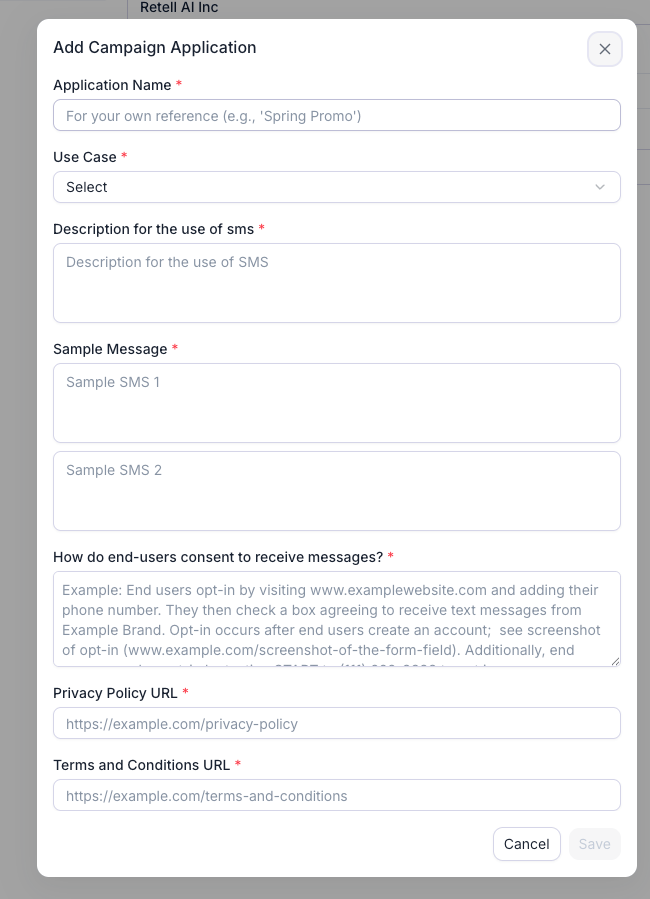
The Add Campaign Application form, with the business profile and brand steps completed behind it.
Step 1: Choose a use case
Pick the one that describes what you will actually send. If you’re unsure, choose Low Volume Mixed. Retell’s campaign fee is the same for every use case.Step 2: Write the campaign description
The description must say:- Who is sending the messages
- To whom you’re sending them
- What the messages are about
- When you typically send them
- How recipients opted in
Acme Home Services uses this campaign to send two-way customer support messages, follow-ups to phone conversations, requested quotes and service information to existing customers and prospective customers who contact us by phone or request a call on our website at https://www.acmehomeservices.com/contact. Recipients opt in verbally during a call with our automated AI phone assistant, or by submitting our website contact form. Messages are transactional and informational only, sent after a call or when a customer requests information. Every message identifies Acme Home Services and includes opt-out instructions (reply STOP).Example for Low Volume Mixed appointment reminders:
Bright Smile Dental uses this campaign to send appointment confirmations, appointment reminders, reschedule notices and post-visit follow-ups to patients who have booked an appointment with our office. Patients opt in verbally when they book by phone with our automated scheduling assistant, or by checking the SMS consent box on our online booking form at https://www.brightsmiledental.com/book. Messages are informational only and are sent when an appointment is booked, 24 hours before the appointment, and after the visit. Every message identifies Bright Smile Dental and includes opt-out instructions (reply STOP).
Step 3: Describe how end users consent
This field must say where a person sees the chance to opt in, the exact action they take, and every item in the checklist below. The field accepts 40 to 2,048 characters. Consent must come directly from the person to your business. It can’t be implied, collected by or shared with a third party, or taken from a purchased list. Check that your consent text includes: If you collect consent both ways, include both flows below, followed by one post-opt-in confirmation paragraph with the confirmation text. Verbal opt-in during a call- The checkbox is unchecked by default and not required to submit.
- Transactional and marketing texts each have their own checkbox.
- SMS consent is separate from email consent and from accepting the Terms.
- The business name on the page matches the brand.
- The form has a field for the person’s phone number.
Update your agent to ask for consent
Whenever an agent collects consent, it must say the script you submitted. Add this to your agent’s prompt, and paste in the exact script from above:Step 4: Add your Privacy Policy and Terms URLs
Enter the fullhttps:// address of each page in the Privacy Policy URL and Terms and Conditions URL fields. Both pages must be live and on your own domain.
Your Privacy Policy must:
Step 5: Write two sample messages
Each sample must be 20 to 200 characters. Keep it under 160 characters so it sends as one segment. Your samples must:- Include your [Business Name].
- Include an opt-out line such as “Reply STOP to opt out.”
- Show templated values in square brackets:
[Date],[Time],[Agent Name]. - Use only links on your own domain, not a URL shortener like bit.ly.
- Match the use case, the description, and what your website offers.
- Use the same frequency statement, such as “Msg frequency varies” or “up to 4 msgs/month”, across both samples and the consent text.
Step 6: Save and submit
Click Save, then click Next on the SMS panel to submit the application for this number. Save stays disabled until every required field passes validation. Registering the campaign costs $15 one time, charged whether or not it’s approved. Resubmitting a rejected campaign under the same use case is free; the $15 is charged again only if a new campaign has to be registered. Retell emails your account’s email address when you submit, when the campaign is approved or rejected (with the reason), and when the number is enabled for SMS. The status and any rejection reason also show on the SMS panel.If your campaign is rejected
The rejection reason shows on the campaign in the dashboard. Fix every issue it names before resubmitting; most rejections cite more than one. To resubmit, click Edit on the rejected campaign, fix the fields, click Save, then click Next on the SMS panel. Don’t resubmit a campaign rejected for prohibited content, such as cannabis, gambling, sexual or hate content, lead generation, or high-risk lending: editing the application can’t fix it. Campaigns declined repeatedly without real changes may be flagged, so make sure every resubmission fixes every reported reason. Only rejected campaigns can be edited, and every field stays editable except Use Case. If the reason blames the use case, add a new campaign under the right one instead.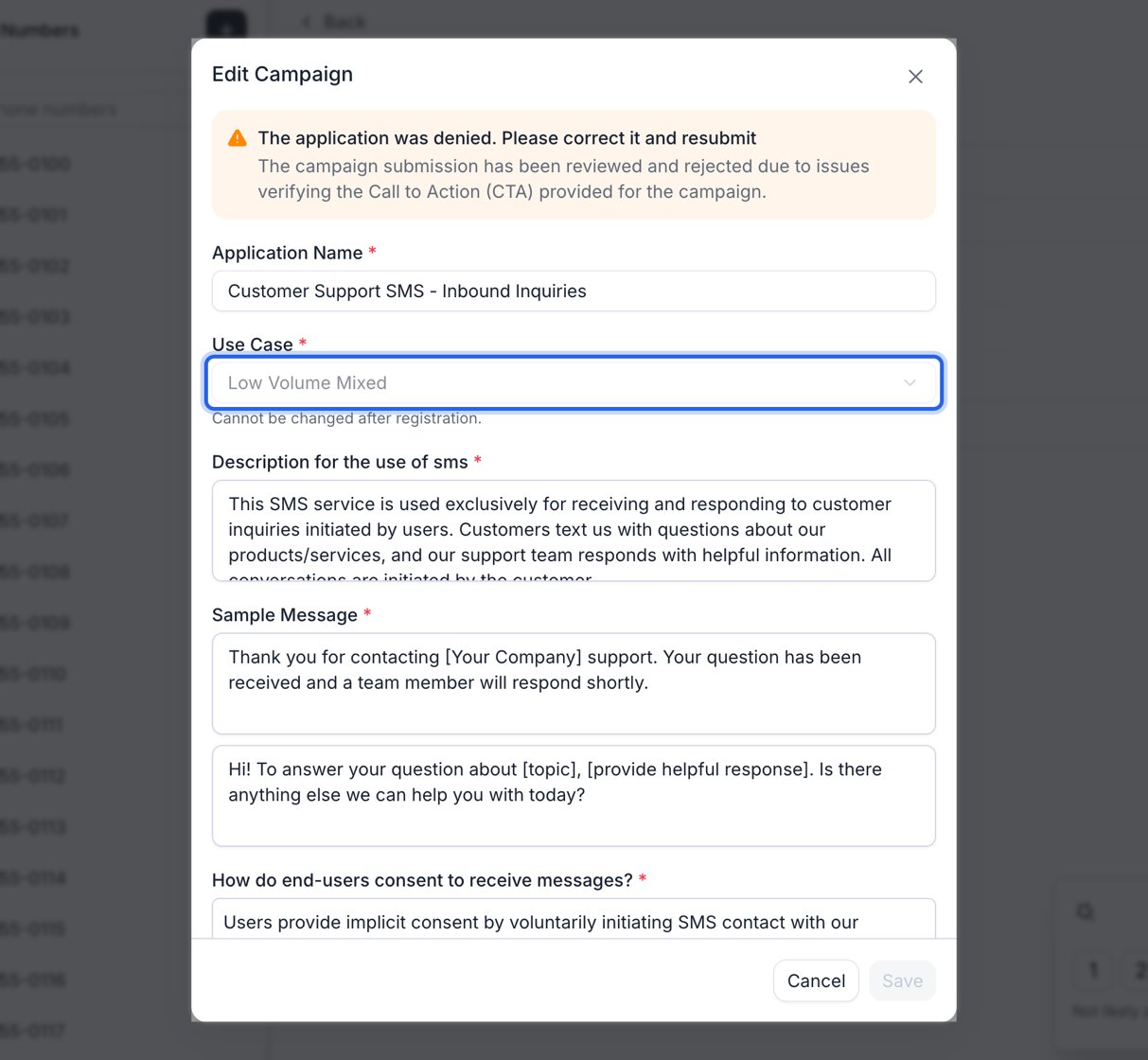
Reopening a rejected campaign. The reason sits at the top and every field stays editable except Use Case.
- Business profile. No brand or campaign can be submitted while the business profile is unverified. The usual cause is a legal name or EIN that doesn’t match the IRS record. See handle application rejection.
- Brand. Reopen it under Brand Registration and correct it. While it’s rejected, the campaign controls stay disabled.
- Campaign. Edit and resubmit it once the brand is approved or pending. Submitting the number while the brand or campaign is still rejected fails with “Please update and resubmit the brand first” or “…the campaign first”.
What does the rejection wording mean?
Fees
Retell bills these charges to the card on file (as of November 2026). Retell’s telephony and vetting partners, The Campaign Registry, and the mobile carriers can revise them.FAQ
Why was my campaign rejected for "Call to Action" or "opt-in information"?
Why was my campaign rejected for "Call to Action" or "opt-in information"?
My rejection lists several reasons. Can I fix them one at a time?
My rejection lists several reasons. Can I fix them one at a time?
Can my AI agent collect consent verbally on a call?
Can my AI agent collect consent verbally on a call?
Can I make SMS consent required to book or buy?
Can I make SMS consent required to book or buy?
Which use case should I pick for appointment reminders?
Which use case should I pick for appointment reminders?
My brand was rejected because the legal name doesn't match my EIN. What do I do?
My brand was rejected because the legal name doesn't match my EIN. What do I do?
Can I register a non-US number?
Can I register a non-US number?
How long does review take, and where do I see the result?
How long does review take, and where do I see the result?
What does SMS cost after approval?
What does SMS cost after approval?
Do I need the brand approved before I submit the campaign?
Do I need the brand approved before I submit the campaign?
Does resubmitting a rejected campaign cost another $15?
Does resubmitting a rejected campaign cost another $15?
My business profile, brand, and campaign were all rejected. What do I fix first?
My business profile, brand, and campaign were all rejected. What do I fix first?
The rejection says my use case is wrong. Can I just change it?
The rejection says my use case is wrong. Can I just change it?
Can I edit a campaign that is pending or approved?
Can I edit a campaign that is pending or approved?
Can I skip the campaign application?
Can I skip the campaign application?
Do I need to set up STOP and HELP keywords?
Do I need to set up STOP and HELP keywords?