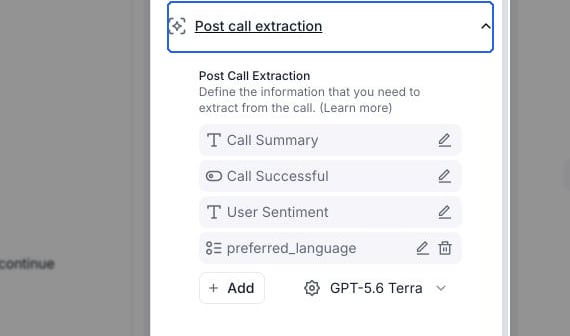
Define Retell Post Call Extraction fields with boolean, selector, text, and number categories to automatically extract structured data from every call.
1
Navigate to Post Call Extraction
Open the agent editor and expand Post call extraction. For a conversation flow, select Global settings first. Select Add, then choose a field type. On a chat agent, the section is named Post chat extraction.
Open Post call extraction to manage fields and add a custom field.
2
Choose Analysis Category Type and Configure
Select the type of analysis that best fits your needs:
Use for simple yes/no determinationsExample configuration:
Name: user_reached
Description: Was the user reached or not? Set to false if voicemail is detected, if you are only asked for the reason of the call, or if you are only asked to leave a message. Otherwise, set to true.