Enable Retell single or multi-prompt agents to navigate DTMF-input IVR menus by pressing keypad digits during outbound calls to reach the right department.
On outbound calls, your agent often reaches an IVR (Interactive Voice Response) menu before it reaches a person, such as “Press 1 for scheduling, press 2 for billing.” The Press Digit tool lets the agent press keypad digits (DTMF tones) to work through that menu and reach the right department on its own.There are two kinds of IVR menus:
Audio-input IVR accepts spoken responses. Your agent handles these through normal prompting, with no tool needed.
DTMF-input IVR requires keypad presses. This is what the Press Digit tool is for.
Add the Press Digit tool when a single-prompt or multi-prompt voice agent places outbound calls that pass through DTMF phone menus, such as reaching a scheduling line, entering an extension or account number, or navigating a partner’s support tree to a live rep.Reach for a different feature when:
You’re building a conversation flow agent. Use the Press Digit Node instead, which handles IVR navigation as a dedicated node with its own transitions.
You want to capture digits the caller presses, like a PIN or menu choice, rather than press digits yourself. See Capture DTMF input from user.
You just want the agent to hang up when it hits an IVR instead of navigating it. See IVR hangup.
Press Digit is voice-only. It isn’t available for chat agents.
Example: A dental clinic’s outbound agent calls an insurance provider to verify coverage. The provider answers with a DTMF menu: “Press 1 for members, press 2 for providers.” The agent presses 2, enters the patient’s member ID when prompted, and reaches a claims rep without a human ever dialing in.
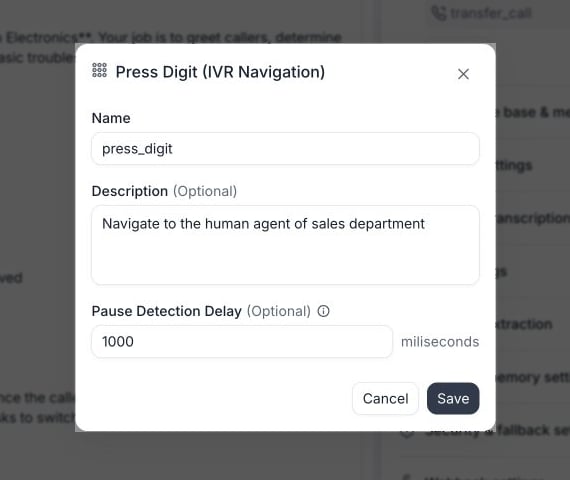
Expand Functions, select Add, then choose Press Digit (IVR Navigation). The description is optional. Leave it blank to use the default, or specify when and what to press to steer the agent.
Configure the Press Digit tool before saving it.
Pause Detection Delay controls how long the agent waits after the IVR pauses before pressing, so it captures the whole menu before deciding. The default is 1000 ms (1 second), and the valid range is 0–5000 ms. Increase it for IVRs that speak slowly or pause mid-menu, so the agent doesn’t press before the options finish.
2
Add navigation prompts
Tell the agent what it’s trying to reach. Include the keywords or phrases to listen for, the ones to avoid, and how to handle an unclear menu.Example prompt:
    ## IVR Navigation
    When interacting with automated systems, menus, or IVR prompts:

    Your goal is to reach the scheduling or appointments department.

    Preferred navigation keywords:
    • Scheduling
    • Appointments
    • New patients
    • Front desk

    Avoid:
    • Billing
    • Referrals
    • Medical records
    • Clinical departments

    If you are unsure which IVR option is correct:
    Choose the option most closely related to scheduling or appointments.
If you already know the exact sequence, tell the agent directly instead:
Press digit 1 to reach the support department.
You can press a single digit or a full sequence such as 1234# for an extension, using the keys 0–9, *, and #.
3
Add interaction rules
Cover when to press versus speak, and the edge cases like reaching the wrong company, being transferred, or being put on hold.Example prompt:
    ## IVR Interaction Rules
    1) If the IVR allows you to speak a department name or short phrase:
        - Speak the appropriate department name clearly.

    2) If the IVR explicitly instructs you to press a number:
       - Use the press_digit function with the instructed digit.

    3) If the IVR does not accept speech and requires numeric input:
       - Use the press_digit function to select the best option.

    4) If the IVR indicates that you have reached the wrong company:
       - Immediately call end_call.

    5) If you are transferred:
       - Wait silently or respond with NO_RESPONSE_NEEDED if prompted to hold.
       - Resume navigation or follow the live agent flow once connected.
4
Extract IVR post-call data (optional)
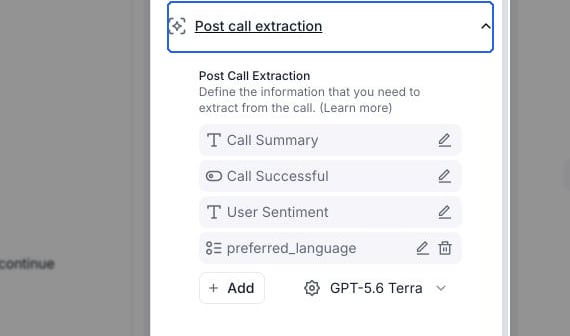
Extract IVR navigation data for reporting and debugging. Add these field-by-field prompts under your agent’s Post call extraction section.
Use Add in Post call extraction to define your IVR fields.
hit_ivr (boolean)
Was an IVR or automated phone system encountered at any point before reaching a human? Count menus, “press 1”, speech menus, automated routing, or virtual assistants as IVR. Do NOT count hold music after a human answers. Output ONLY true or false.
reached_human (boolean)
Did the caller speak with a real human staff member at any point during the call (not an automated system, recording, voicemail, or virtual assistant)? Output ONLY true or false.
ivr_loop (boolean)
Did the IVR appear to loop or repeat the same menu/prompt due to misunderstanding or invalid input (e.g., repeated “I’m sorry, I didn’t get that” or returning to the main menu multiple times)? Output ONLY true or false.
ivr_type (enum)
Allowed values:none | basic_menu | speech_ivr | voicemail_greeting_only | after_hours_message_onlyClassify the type of automated system encountered:
none: no automation, human answered directly
basic_menu: “press 1/2/3” style DTMF menu
speech_ivr: system asks spoken questions like “tell me why you’re calling” and responds conversationally
voicemail_greeting_only: immediately reached voicemail greeting/leave-a-message flow (no menus)
after_hours_message_only: only an after-hours closed message (may mention hours), without offering routing to staff
ivr_outcome (enum)
Allowed values:reached_human | left_voicemail | hung_up | blocked_by_ivr | callback_required | transferred | ivr_loop_detected | invalid_extension | after_hours_info_onlyWhat was the final outcome of the IVR/automated navigation portion of the call?
reached_human: successfully got to a human
left_voicemail: reached voicemail and a message was left or the voicemail prompt occurred as the end state
hung_up: call ended before any resolution (caller or system disconnected)
blocked_by_ivr: could not proceed due to IVR requirements or no matching menu option
callback_required: system instructed to call back later or offered callback as the only option
transferred: IVR transferred to a line/department (even if later hold)
after_hours_info_only: ended at after-hours info message with no human reached
ivr_steps_count (number)
How many distinct IVR steps occurred (menu prompts or bot questions that required an input/response) before reaching a human or ending? Output ONLY an integer. If none, output 0.
ivr_retries_count (number)
How many times did the IVR/bot request the same input again or say it didn’t understand (e.g., “please repeat”, “invalid entry”, returning to same menu)? Output ONLY an integer. If none, output 0.
ivr_path (text)
Summarize the IVR navigation path as a breadcrumb using > separators, capturing the main menu choices or intents.Example:Main Menu > Providers > Authorizations > Hold
ivr_notes (short text)
In 1–2 sentences, summarize the key IVR insights that matter operationally (e.g., required identifiers, department options heard, barriers like “portal only”, after-hours).
ivr_tree_text (multiline text)
Create a concise step-by-step IVR tree in numbered lines. Each line must be:N. Prompt: "<summary>" | Action: "<pressed/said>" | Result: "<next state>".Include only steps that occurred.
5
Test your configuration
After saving your agent, test it by either:
Placing an outbound call to a number with a real IVR, or
Calling yourself and mimicking an IVR by saying phrases like “Press 1 for customer service.”
If you run your own LLM instead of Retell LLM, you don’t add the Press Digit tool. Instead, set digit_to_press on your response in the LLM WebSocket protocol, and Retell sends the DTMF tones after the associated content finishes. Have the agent stay silent for that response so it doesn’t speak while pressing. See function calling for a custom LLM for a worked example.
The agent decides at call time by matching the live menu against your prompt, so there’s no preset digit field. If you always want the same press, say so explicitly in the prompt, such as Press 1 to reach the support department.
The agent presses before the menu finishes. How do I fix it?
Increase the Pause Detection Delay on the Press Digit tool. It defaults to 1000 ms and accepts up to 5000 ms. A longer delay gives slow IVRs time to read the full menu before the agent decides.
Which keys can the agent press?
Digits 0–9, *, and #. You can send a single key or a sequence in one press, such as an extension like 1234#.