

Set denoising mode
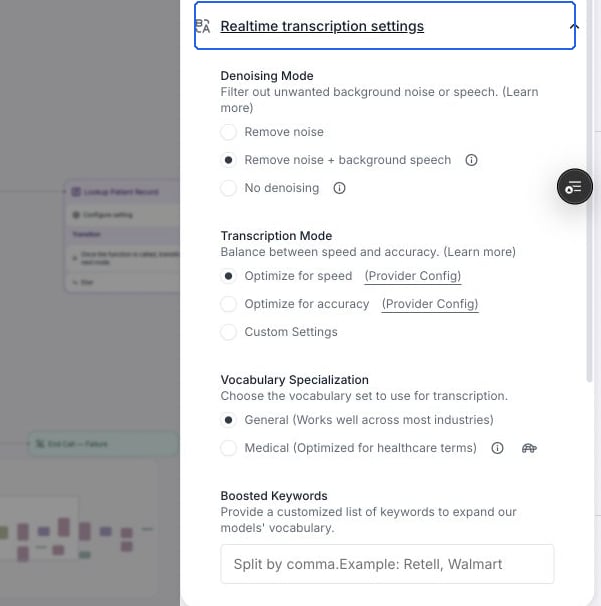
Find Denoising Mode under Realtime transcription settings.
- No denoising: disables all audio preprocessing and passes the raw audio signal directly to the ASR model. The ASR model itself can handle a minimal level of ambient noise without preprocessing. Choose this mode if you experience issues with missing short responses (e.g. “sure”, “yes”) or degraded accuracy with non-English transcription, particularly when background noise is not significant.
- Remove noise (default): removes background noise with nearly no distortion to the waveform, so it has no meaningful impact on speech-to-text accuracy. It will not remove loud background speech.
- Remove noise + background speech: a more aggressive mode that removes both background noise and background speech. This may distort the waveform and can reduce speech-to-text accuracy in some cases. This option incurs a $0.005/min surcharge due to the additional processing required.
Because this model keeps only the dominant near-mic voice, the speaker you care about must be the clearly dominant voice on the line. If your user is far from the mic, soft-spoken, or no louder than the people around them, the model can mistake them for background speech and filter them out.
- No single dominant speaker — speakerphone in a room, two people equally close to the mic, or a handoff between people. The model may pick the wrong voice, switch between voices, or drop one of them.
- The intended speaker is quiet or distant while background voices are loud (e.g. a far-field mic). Your user can be treated as background and suppressed.
- Already-clean, single-speaker audio. The extra processing distorts the waveform and can lower accuracy or drop short utterances (e.g. “yes”, “sure”) that
Remove noisewould keep — with no benefit and an added surcharge. - Non-speech or machine audio that you still need transcribed — IVR prompts, voicemail greetings, hold music, or announcements. Aggressive voice isolation can mangle or drop these, since the model is tuned to keep a live human primary speaker.
Remove noise + background speech mode, and verify accuracy on real calls before rolling it out. For most use cases, Remove noise is the recommended default.
Tuning interruption sensitivity
If background speech or noise still causes unwanted interruptions after denoising, lower Interruption Sensitivity. The range is 0–1. Higher values make the agent easier to interrupt; lower values require the caller to speak longer or say more words before interrupting. At 0, the caller cannot interrupt the agent. The API defaults to 1 wheninterruption_sensitivity is omitted. New blank voice agents created in the dashboard start at 0.9.
- Open Speech settings in the agent settings panel.
- Lower Interruption Sensitivity from its current value, for example from 0.9 to 0.8.
- Test with representative background noise and check that callers can still interrupt when needed.

Interruption Sensitivity set to 0.8 in Speech settings.
Remove noise from the user’s side
As the audio quality is determined by the user’s side, you can also try the following:- User side noise reduction: use better microphone & client side noise reduction libraries if using web calls
- Prompt the agent to ask your users to speak louder so it can be distinguished from background speech easier